
Six places, one loop: from what they said to whether it worked.
Learn holds what your users said. Build holds what you decided and shipped. Ask Mind answers across both, with sources.
14 days free. No card needed. Or try the live demo, no sign-up.
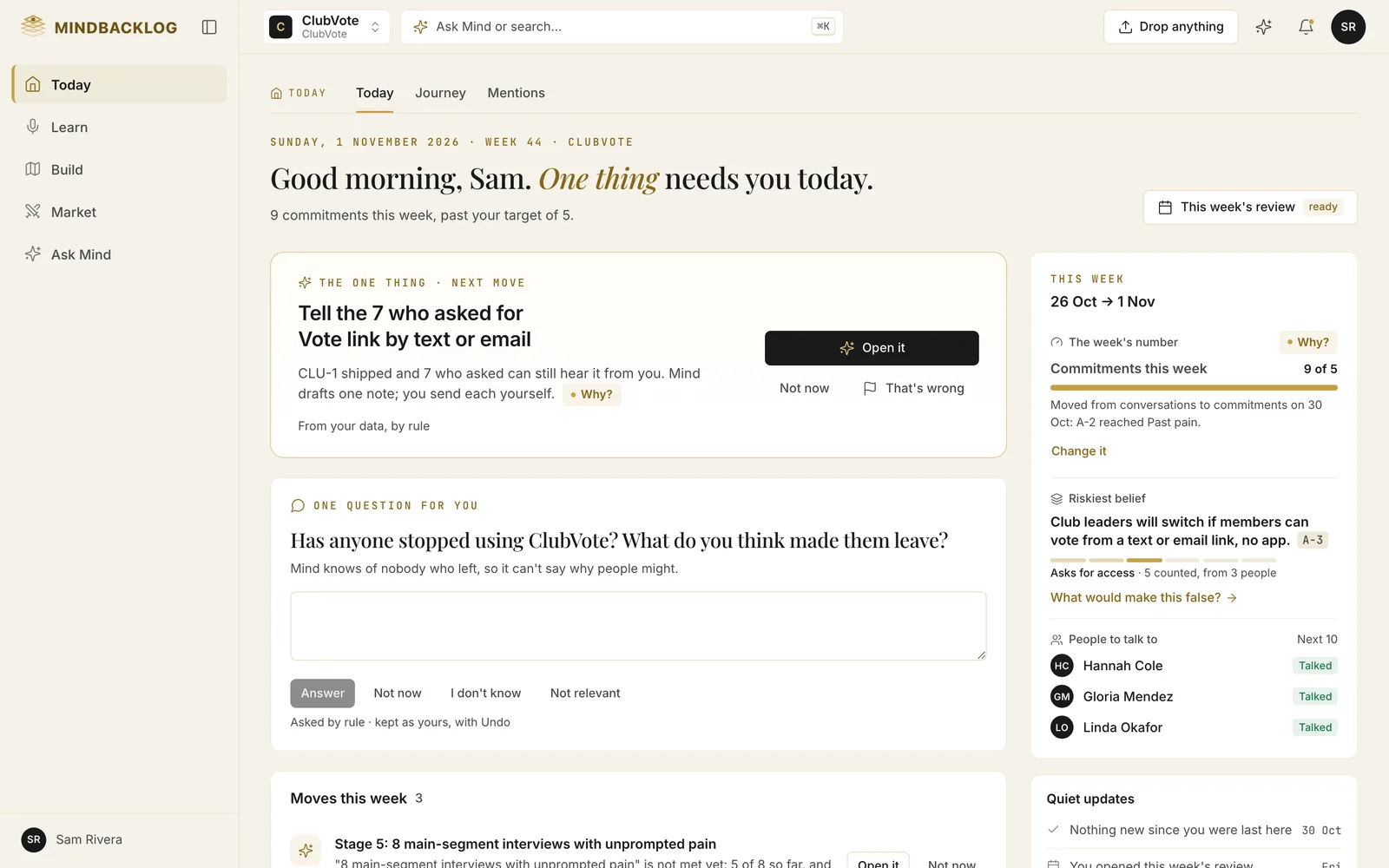
One next move every day, with its why.
Chosen by rule from your data, with the counts, quotes and dates behind it.
The one thing
A test behind pace, a call with no script, or a decision due for review.
How Today worksJourney and the check-in
Where you are on the way to product-market fit, and a monthly check-in.
Start from an ideaThe weekly review
Every Friday: what moved, your calls checked, and an update you send yourself.
The weekly reviewWhat your users need, in their words.
Problems ranked by who has them, with the quotes behind each. Praise doesn't count as proof.
Feedback and Drop anything
Drop a thread, a transcript or a CSV. Mind, the AI in MindBacklog, shows where it'll go before filing it.
FeedbackProblems and Check a request
Your users rank first; public posts are shown, not counted.
ProblemsQuestions, Conversations, Tests, Decisions
Beliefs on the evidence ladder, and a pass line set before the test starts.
Validation with evidencePeople and Who it's for
Every person who wrote in, talked with you or paid you, on one page.
PeopleHand your coding agent the why.
The Build Pack carries the why into Claude Code, Cursor or Lovable. After launch, tell the people who asked and check your prediction.
Build Pack
Why it matters, who it's for, the metric, and the must-haves with acceptance criteria.
The Build PackProduct map
What your product does by area, and what's live, in progress or scoped.
The product mapInitiatives and features
A prediction written before you build, and one page from why to what to build.
InitiativesPlan
The foundations a senior engineer would insist on, each with its reason.
Build › PlanLaunch and Results
Mind drafts a note to each person who asked; you send it. Results checks your prediction.
Launch and ResultsDocuments
Every document in one list, each saying whether feedback arrived since its last edit.
DocumentsYour market, your answers, and whether fit holds.
Every read is dated and sourced, and every answer shows where it came from.
Market
Competitors, your industry and your positioning. Every read is dated and sourced, and none of it counts as your evidence.
Competitor monitoringAsk Mind
Ask about the page you're on. Mind shows its steps and sources, and says when your data has nothing on a question.
How Ask Mind answersGrow
PMF health by segment, revenue and retention, read-only from your own Stripe. Under the threshold it says "Not enough data".
GrowEvery tool you connect lives in one place.
Where do I start if I have no users yet?
Start from an idea. Mind drafts your thesis, who it's for and the beliefs to test, each with the quote it came from. It drafts fewer things rather than guess. Learn › Questions holds the beliefs; Today gives you one next move a day.
Which place does my coding agent use?
Build. Your coding agent pulls the Build Pack for a feature: why it matters, who it's for, the metric, and the must-haves with acceptance criteria. Your coding agent writes the product map. MindBacklog never reads your code.
When does Grow appear?
Past product-market fit, or from 10 paying accounts. It reads PMF health by segment, revenue and retention from your own Stripe, read-only. Under the threshold it says "Not enough data" instead of a verdict.
Does Mind decide anything for me?
No. Mind drafts; you decide. Every call you make keeps its reason in Decisions, and the number you expect from an initiative is always yours. Mind fills in the metric and the check date.
What do you keep about my customers?
Stripe customers become people, keeping only the email, first name and last initial, plan and payments. Never kept: the full last name, address, phone, tax id or card. Personal details can be cleared.
Start with one place.
Drop a thread into Learn, or pull one Build Pack into your coding agent. The rest follows.
- 14 days free
- No card needed
- Viewers are free
Or look around a sample workspace first. No sign-up.
