
Your whole product, in plain words.
What it does by area, what's live or just scoped, and where users hurt. Your agent writes the map; MindBacklog never reads your code.
14 days free. No card needed.
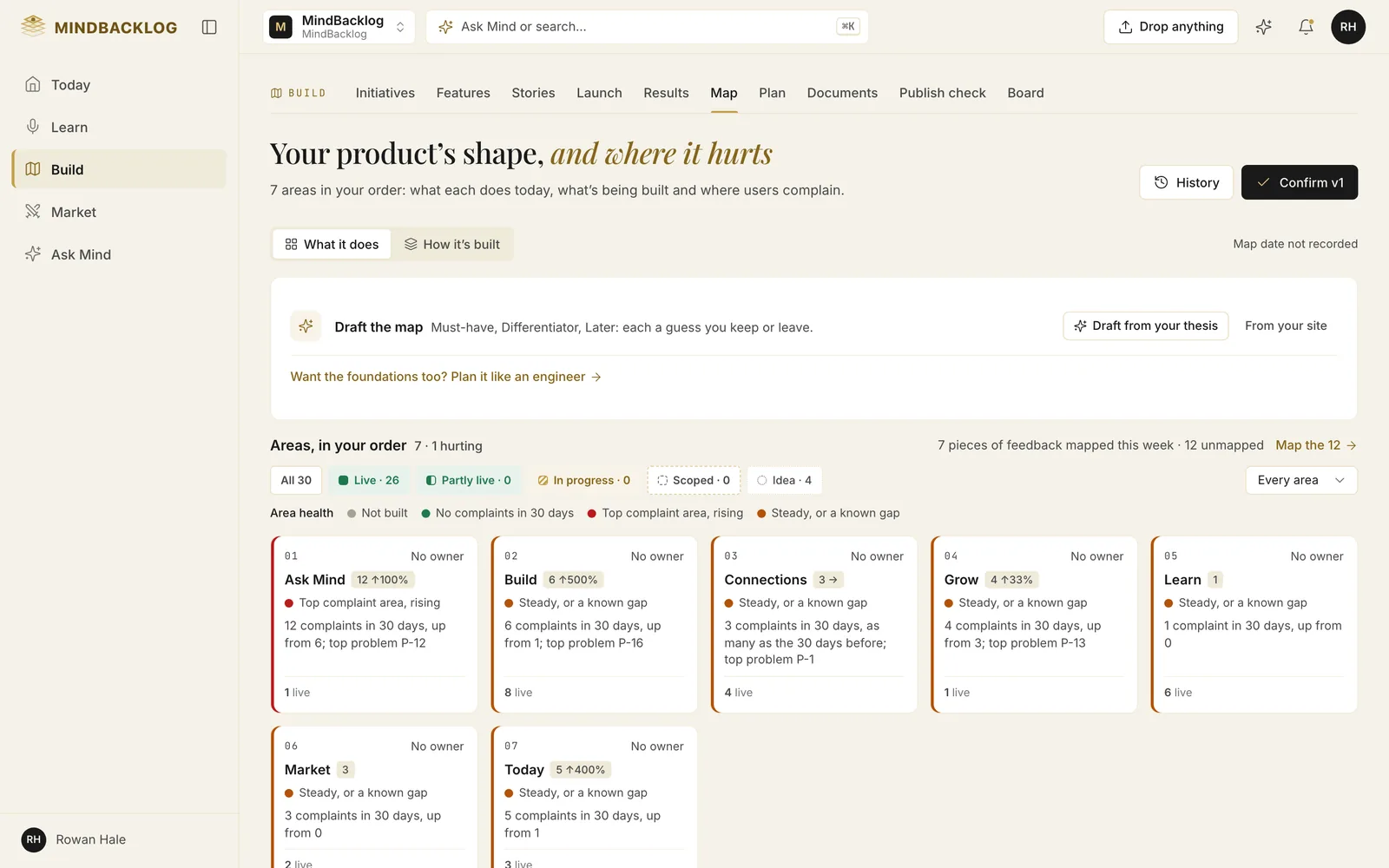
Your agent has your code. It writes the map.
Your agent maps your product from prompts in Settings › Developer: its parts, conventions and what users can do.
Connect your agent
Use MCP with a read-and-update token, so the map is a write recorded under your name.
Paste "Map my product for MindBacklog"
Your agent lists your parts, conventions and capabilities, then shows a preview of what would change.
Say yes
Only then is the preview applied, and the next map shows only what moved.
Worked out from what happened. Never set by hand.
Each capability and feature shows one of five states, derived from your records, not typed in. Area health says where users hurt, in words and counts as well as colour.
- Live
- On your map, mapped by your agent or added when a feature shipped.
- Partly live
- Live, with what it doesn't do yet listed from open stories and the spec.
- In progress
- A feature or story in build, a commit naming it, or a report saying it isn't done.
- Scoped
- A spec or stories exist, and nothing has started.
- Idea
- Everything else.
ALREADY EXISTS. WHERE IT FITS. TOUCHES.
Every Build Pack then says what already exists, where the feature fits and what it touches.
Report this build
When your agent finishes a feature, paste the report prompt. It sends the files it changed and what a user can now do.
Your call to ship
A report never changes a status and never ships a feature. Moving it to Shipped is your call.
What the pack missed
A report can say where it left the Build Pack and why. It is what the agent says, never checked by MindBacklog.
Draft the map from your thesis.
At the idea stage, Draft the map proposes up to twelve things your product should do. Each has one sentence of why, from your positioning or a competitor's own dated docs.
Every row is a guess, and every row arrives unticked: tick the ones you want, and each becomes an Idea feature. Mind never claims a competitor lacks something.
What never leaves your repository
Every connection, your AI tools included, is set up from Settings › Connections, and the publish check runs before each release. If you build with Lovable or a developer, start with the page for market founders.
Does MindBacklog read my code to build the map?
No. Your agent already has your code, so it lists your product's parts, conventions and capabilities and sends the map over MCP. MindBacklog never reads your code, and you approve a preview before anything changes.
Which coding agents can write the map?
Map your product has copy prompts for Claude Code, Cursor, Lovable and Codex. An agent connected over MCP with a read-and-update token sends the map itself. An agent that can't call MindBacklog prints the map as JSON, and you paste it in.
Can I undo a map?
Yes. Your agent can undo the most recent map within 30 days. What it added is retired, never deleted, and every earlier version is kept. Parts you added yourself are never touched by a resync.
Is the map public?
No. The map is never shown on your public roadmap or portal. Everyone in the product reads the capabilities and area health; the parts of your app and the conventions are for editors and admins only.
Does mapping cost AI credits?
Mapping and reporting over MCP cost nothing: the tools make no AI calls. Draft the map before you have code, and the plain-words description Mind writes from the map, use AI credits.
See what's actually built.
Paste one prompt into your coding agent. Approve the preview. Every Build Pack after that knows what already exists.
- 14 days free
- No card needed
- Viewers are free
